Real-time file watcher
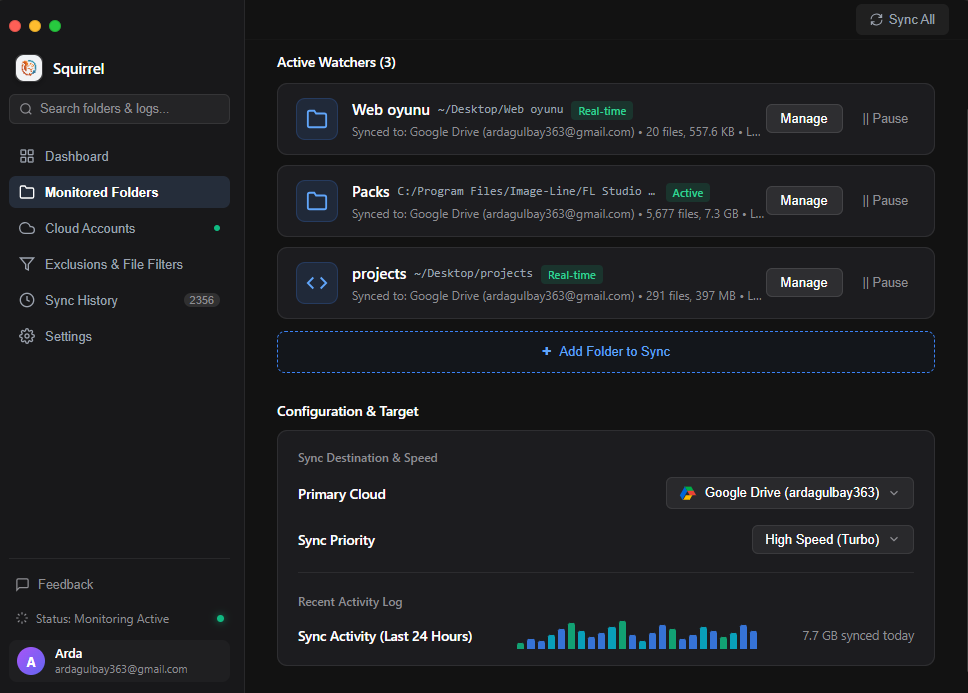
Every create, edit, rename and delete is detected the moment it happens. Squirrel reacts in milliseconds, so your work is backed up before you close the tab.
Squirrel keeps any folder on your PC in perfect sync with Google Drive, OneDrive, Dropbox, MEGA and iCloud Drive — in real time, straight from your desktop. No browser tabs, no dragging, no waiting.
Cloud clients are bloated, opaque and tied to one vendor. Squirrel is a single, tiny desktop app that watches the folders you choose and mirrors them to the cloud you choose.
Every create, edit, rename and delete is detected the moment it happens. Squirrel reacts in milliseconds, so your work is backed up before you close the tab.
Connect several providers and give each folder its own destination. Personal stuff to Drive, client work to Dropbox — no conflicts, no account juggling.
Deleted something on the web while your PC was off? On startup Squirrel diffs local and remote manifests and applies changes cleanly in both directions.
DAW project saves, IDE builds, game assets, VM images. Squirrel keeps up without eating your CPU, even when thousands of files change at once.
Filter out .tmp, node_modules, .git, .DS_Store, cache files or anything you define. Only meaningful data travels.
Full control over running jobs. Throttle a big upload, stop a batch before a meeting, or resume later exactly where you left off.
No developer console, no API keys to copy-paste. Click sign in, approve in the browser, and the account is connected — tokens stay local.
Every batch is recorded locally: files moved, bytes transferred, timestamps. See exactly what Squirrel did overnight — without any cloud account.
Point Squirrel at any directory — a project, a photo library, your whole Documents folder. It doesn't move or restructure anything.
One click opens your browser for OAuth. Grant access, come back, done. MEGA uses encrypted email login instead — no developer console required.
Save files the way you always do. Squirrel handles the rest in the background and writes everything into its own Squirrel folder on the cloud.
One slider decides how aggressively Squirrel works. Switch profiles at any time — even mid-sync — and it adapts instantly.
Maximum bandwidth, zero delay between files. Best for bulk imports, migrations and first-time uploads of large folders.
Measured during continuous IDE builds and DAW project saves. Squirrel never blocks your foreground apps.
Squirrel is local-first. Data moves directly between your computer and the cloud provider you authorized. No analytics, no tracking pixels, no license checks, no remote config.
config/ folderdrive.file — only files Squirrel createsSquirrel/ folder
Free forever. No account, no subscription, no “upgrade to Pro”. Just a squirrel doing the heavy lifting.
git clone https://github.com/ArdaG1/Squirrel.git
cd Squirrel
npm install
npm start
Requires Node.js 18+ and npm.
Yes. Squirrel is free and open source under the MIT license. There is no paid tier, no file-count limit and no ads.
Each provider connection is stored separately, so you can attach accounts per provider. If you need a specific OAuth client, open Advanced: Developer Credentials and point Squirrel at your own credentials.json.
On the next launch Squirrel compares the local and remote manifests. Deletions and changes made on either side are reconciled cleanly, in both directions — no ghost files, no duplicates.
In Smart mode Squirrel inserts a 100 ms throttle between file operations, keeping CPU usage below 0.5% even during intense workflows. Eco throttles further for battery life, while Turbo uses everything available.
No. For Google Drive, Squirrel requests only the drive.file scope, meaning it can only access files and folders it created itself. Other providers use similarly narrow permissions, and all tokens remain on your machine.
The current release targets Windows 10 and 11 (x64) with both an NSIS installer and a portable executable. The interface itself is built with Electron and web technologies, so other platforms are on the roadmap.
Squirrel writes everything into a dedicated Squirrel folder in your drive. Nothing is moved or restructured elsewhere, so you can always find — or remove — exactly what it uploaded.
Let a squirrel handle it.